Spaces

Everything in Spaces

One server on your machine, two ways in, and every agent's state at a glance.

spaces

Starts the server in the background if it is not running, then opens the client. Prebuilt for Linux, macOS and Windows; works over SSH.

Sidebar

Every space with its agents’ combined state and, for a git repository, its branch, ahead/behind counts and a dirty marker. Below it, every agent: blocked, working, done or idle.

Tabs and split view

The active space’s panes as tabs. Split to watch two at once. Right-click a tab to close the pane or move it to another space.

Menu

Create, rename and colour spaces; start an agent, offering to resume one of the folder’s past sessions; focus, close or restart panes.

Toasts

An agent in another pane that blocks or finishes says so. Click the toast to jump to it.

Restarts

Panes stopped by a server restart or a reboot start again when you select their space.

Live sync

A change made in the web app shows up in the terminal client within about a second, and the other way round.

ctrl+kOpen or close the menu
ctrl+space dDetach: quit the client, leave every agent running
ctrl+space sSplit the view to show a second pane, or unsplit
ctrl+space fOpen the space's Files tab
ctrl+space bHide or show the sidebar
ctrl+space oSort agents by space or by priority
ctrl+space mRelease the mouse so your terminal can select text

Every other key, ctrl+c included, goes to the focused pane.

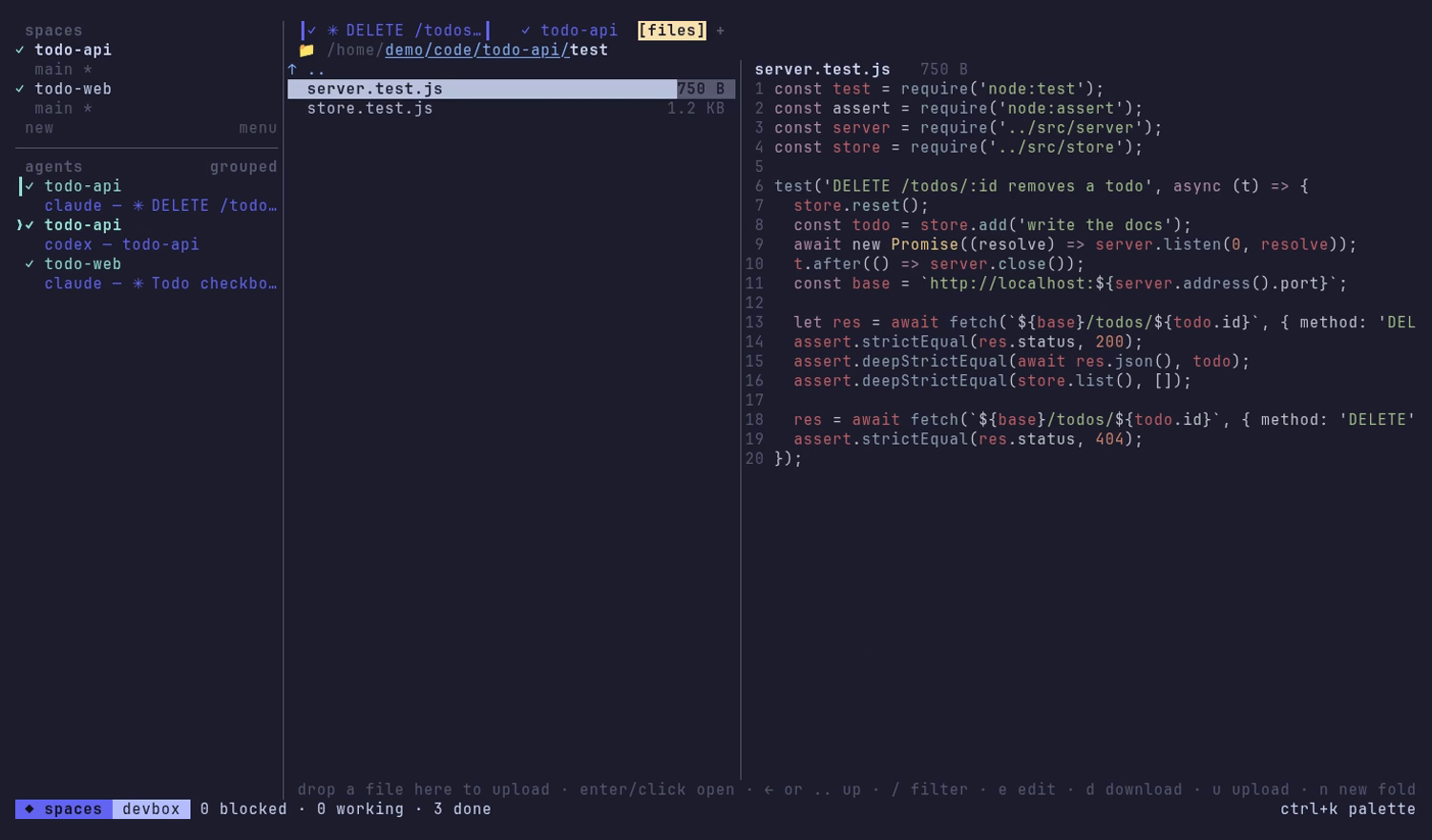
Your project’s files, in the terminal

  • Browse with the arrow keys, the .. row or clickable breadcrumbs; the selected file previews live, highlighted. / filters.
  • Download files or whole folders with d; open images and PDFs on your own machine with o.
  • Upload with u, or drag files and folders onto the tab.
  • Manage: new folder, rename or move, delete after a confirmation.
  • Edit a text file with e; a save is refused if the file changed since you opened it.

It reaches only your dev directories and the agents’ transcript folders. Credential folders such as ~/.ssh and ~/.aws are always refused.
files
The Files tab with a highlighted file preview

spaces --remote you@devbox

Your local terminal client, driving Spaces on another machine over SSH. It installs Spaces there first if it is missing, and offers to set up your SSH key.

spaces --remote demo@devbox

Nothing new to expose

The remote keeps listening only on its own loopback. Spaces opens an SSH tunnel to it and signs in with a session token the remote hands back over SSH; its secret never leaves it.

Your SSH, as it is

Keys, agents, ~/.ssh/config aliases and jump hosts all work. Spaces is started on the remote if it is not running.

Shared machines

Several people can each run their own Spaces on one server. Each account gets its own port, picked automatically, and answers only its owner.

spaces open

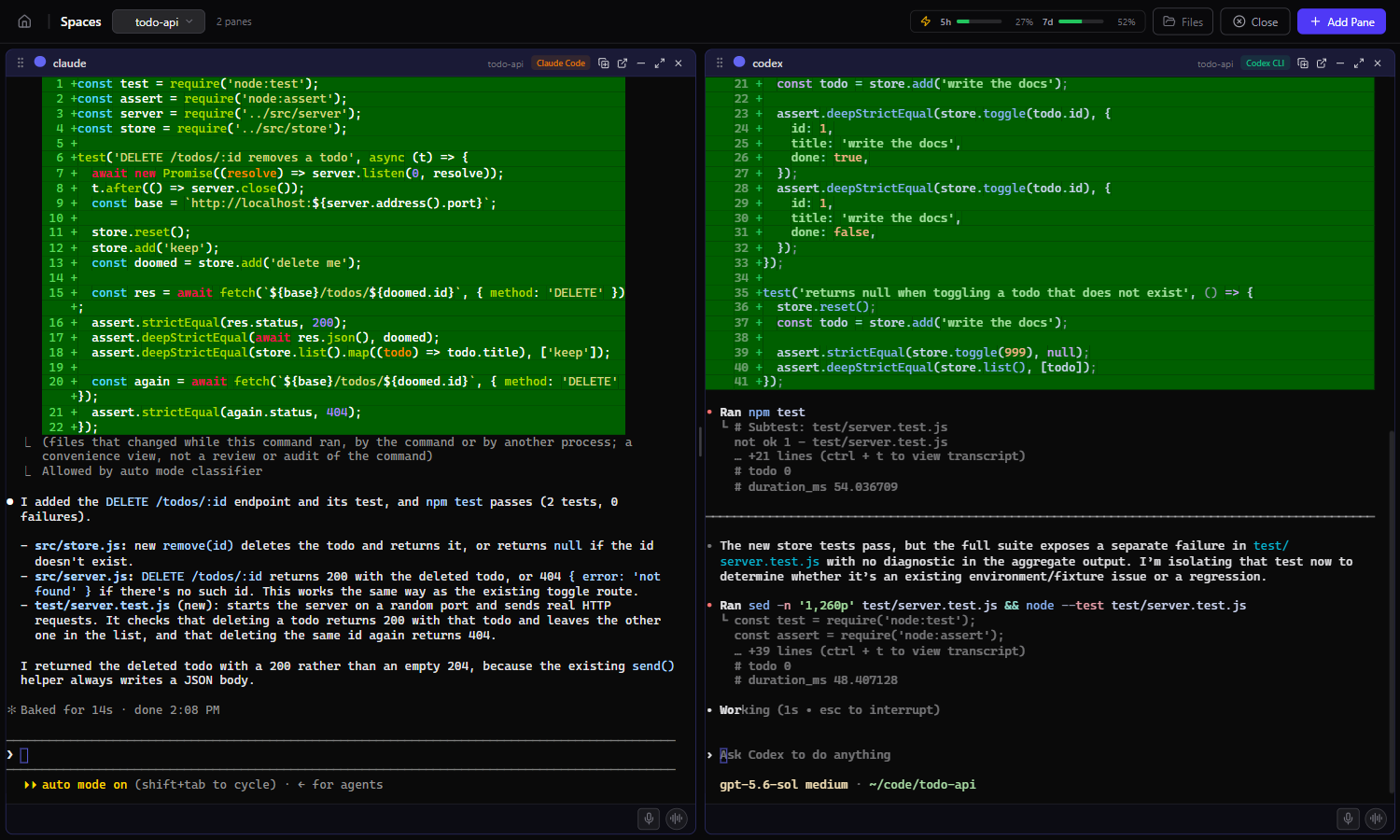
Signs your browser in with a link that works once, for two minutes, and shows the same spaces and agents as a grid of browser terminals.

localhost:3457
The Spaces web app with two agents in a space

Session browser

Past Claude Code, Codex, Gemini CLI and Aider sessions, indexed locally with full-text search. Jump back into any of them.

Dashboard

Session counts, token usage by model, an activity heatmap and cost estimates, computed from your own agent history.

Pane grid

Resizable panes, pop-out windows, per-space todos and a file viewer.

Project wizard

Drafts a space and its panes from a description of what you want to build. Needs ANTHROPIC_API_KEY.

Voice input

Dictate prompts. Needs GROQ_API_KEY or OPENAI_API_KEY.

Phone layout

A touch layout at /m for checking in on your agents away from your desk.

Supported agents

Blocked, working, idle and done detection ships for Claude Code, Codex CLI, Gemini CLI and Aider. Other agents run fine and show as plain terminals.

Claude Code

claude · state detection · resumes past sessions

Codex CLI

codex · state detection · resumes past sessions

Gemini CLI

gemini · state detection · resumes past sessions

Aider

aider · state detection

ForgeCode

forge · resumes past sessions

Pi

pi · resumes past sessions

Any shell

Your own shell, in the same space as your agents

Any command

Any command you give it runs as a pane

A message bus per space

Panes in the same space share a message bus. Agents post what they finished, ask each other for things, and share settings; a request can require your approval first.

Turn on collaboration for a space in the web app and the bus is also offered to Claude Code and Codex as an MCP server.

$ spaces-msg post "API is done, schema in docs/api.md"
$ spaces-msg post --to frontend "endpoints are live on :8080"
$ spaces-msg request "OK to drop the legacy table?"
$ spaces-msg context set api_base http://localhost:8080
$ spaces-msg read --since 1h

One owner, on loopback

Owner-only

Every request must prove it comes from the account that owns the server, with a secret only that account can read. Arriving over loopback proves nothing.

Browser sign-in

A one-time link, then an HttpOnly, SameSite=Strict cookie. Requests naming any host but this machine are refused, which stops DNS rebinding. Credentials never go in URLs.

Sign out everywhere

spaces signout replaces the secret, signing out every browser, terminal client and remote session at once.

Spaces runs your agents as you, without a sandbox: an agent in a pane can do anything you can. See the security policy.

Multiuser and federation

These modes are off by default, unsupported, and not safe for anything you care about. They need --experimental. Multiuser mode adds logins and an admin panel, but any signed-in user can currently gain control of the account the server runs as. Federation lets paired machines drive each other’s spaces, but a paired machine can act as you and the traffic is not encrypted. To use Spaces on another machine, use spaces --remote.

Try it

npm install -g @jlongo78/agent-spaces, then spaces.